Sunday, 11 July 2021

SEO Tips For Blogger Blogs | Blogspot SEO

SEO is very important for any blog or website, let alone blogger blogs.There are many different practices you can follow to ensure that your blogger blog gets a good amount of traffic from search engines such Google, Bing, Yahoo! etc.Unfortunately great and well written content alone is not enough to rank high in search indexes, so you need to do certain other stuff so that you ensure that you get a good SERP ranking in all search indexes.Let us move on and discuss the best SEO practices for blogger or blogspot blogs.

Why Is It Important to do SEO for Blogger Blogs?

Blogspot SEO
Naturally, sub-domains such as .blogspot.com have a tendency to rank lower than top level domains such as .com .org etc.So you, as a blogger blog owner needs to put in some extra effort to ensure that your blogger blog comes to the top of the Google search results.Also, blogger blogs, being free domains have been extensively used for spamming in the past few years, due to which all the major search engines look at them cautiously, so you need to gain the trust of the search engines by practicing good SEO techniques.

Also, performing proper search engine optimization can lead to a lot of traffic, a well optimized site like  This website can out perform other sites easily in the search engine rankings.

So, I think you have got a good understanding of why you need to perform SEO on your blogger blogs.

Good SEO Practices for Blogger/Blogspot Blogs

There are several different aspects to the SEO of a blogger blog, I have made an attempt to cover all the topics under the search engine optimization of a blogger blog.I have made of list of good SEO practices you need to follow to ensure that your blog hits the top ranks in Google search.

Great SEO begins with Great Content

No matter how many keywords you put in, or how well optimized your site is, if your content is not worth ranking high, then your blog will never get into the top of search results.A well written article or blog post full of quality can do 50% of your SEO job.Imagine if you did not have quality articles, you would miss out on 50% of search engine optimization.So before trying to do complex SEO tasks, you should first concentrate on making great content which covers all aspects of a topic and is spell-binding to the readers.So creating quality content is the basic SEO step for a website, SEO Cosmo is a good example of such a website.

Keywords

Keywords play an important role in enhancing your search rankings, but you need to be careful while using keywords, there is fine line between perfect optimization and over optimization.An ideal keyword percentage would be 4%.This means that you must try to attain about 4% ratio between your content and the number of keywords, anything more than 5% can be considered as spamming.

Also make sure that you include different varieties of your keyword, for example, if your keyword is "training dogs", then you must also include phrases such as "dog training" "how to train dogs" etc.

Do not try to stuff your blog post title with keywords, instead try to use all these keywords in the opening paragraph of your blog post, but make sure that you do not stuff keywords, let the writing be natural and written for the readers instead of the search engine bots.

Meta Tags

If you are an SEO newbie, then Meta Tags may seem daunting to you, but do not worry, blogger has an automatic meta tag feature that you can use without knowing any coding at all.While writing meta tags, you must ensure that you write for people reading the description in the search engines and not for the search bots.

Imagine if a person reads the description of your page on Google Search and sees this "Dog Training, Training Dogs, How To Train a dog.....etc" he is not going to like it, as it seems like a repetition of the title again.Instead try for a meta description tag like this "Learn some good and easy ways to train your faithful friend, your pet, a dog". People will be more inclined to click on the second option rather than the first.

The meta keyword tag is no longer used by any search engines, so do not waste your time on that.

Best Blog Post Title Pattern

Blogger blogs usually have this format of showing post titles in Google search - Blog Name | Page Title, which is not exactly good for SEO, you want your well written page title to appear in the beginning and not your blog name.So make sure that you change the blog post title format by following the steps shown below -

Go to "Edit HTML" of your blogger blog.

Search for the following piece of code -

<title><data:blog.pageTitle/></title>
Replace it with the following piece of coding.
<b:if cond='data:blog.pageType == &quot;index&quot;'>
<title><data:blog.pageTitle/></title>
<b:else/>
<title><data:blog.pageName/> | <data:blog.title/></title>
</b:if>
Now you have the best optimized title format on your blogspot blog.

Permalink Structure For Blogger Blogs


Permalink is the text structure you see in the URL of each of your web pages, usually blogger just converts your title into your permalink structure, this may not always be the best permalink structure for SEO.So you need to change it a more optimized structure so that your blog scores further SEO points.

Backlinks

Backlinks are something that ought to be built naturally, do not really worry much about getting backlinks to your blog, if you have good content, backlinks will automatically follow.But there are certain things you can do to make sure you get a good number of quality backlinks to your blogger blog.
  • Writing Great Content
  • Asking Other Bloggers For Backlinks
  • Blog Commenting
  • Forum Posting
  • Directory Submission
  • Linking Back From Your Other Blogs
These are some of the natural link building methods.

Internal Linking For Blogger Blogs

Blogger blogs do not have the greatest internal navigation structure (depends on which template you are using), so it is good to link your related pages with one another.Try to link as much as possible within sensible limits, if you feel another post would add more quality to a post, then link to it.Make sure that all the blog posts in your blogger blog has at-least one other post that is linking to it.

Sitemaps For Blogger Blogs

Generating a submitting a blogger sitemap to your webmaster tools account can help your blog pages to be indexed faster into Google search and also help the search bots find all your internal pages easily.Learn more about sitemaps for blogger blogs and how to generate it here - Add Sitemap To Blogger

Have A Sitemap Page

The previous point about Sitemaps was for search bots to use, now it is time to make a page where you can have a sitemap of all the posts in your blog based on the month in which they were published for humans to easily navigate through.The simplest form of this page would be to past the links to your month-wise posts such as -

yourblog.com/2012/06
yourblog.com/2012/07


So these are all the basic Blogger blog SEO tips that a blog owner needs to top the Google search results.if you have any doubts or want to add a suggestion, you can do so in the comments section below.


Sunday, 8 July 2012

The Page Rank Table - Value Of Each Page Rank

Page Rank TableSince we are almost near the next page rank update, I though I should give you guys an idea of what it takes to get a particular page rank, as in, how many links of a particular PR is required to get the page rank that you want.

The table below shows the number of links required to get different page ranks.This has been considered as universal, although there are several different factors that come into play while deciding page rank, which I will discuss in this blog post.

We have included the number of backlinks required to get PR3, PR4, PR5, PR6, PR7, PR8.We have not included PR1 and PR2 as they are very easy to achieve by practices such as forum posting, blog commenting etc.

PageRank Calculation

 
PR Links Links Links Links Links Links
For PR3 For PR4 for PR5 for PR6 for PR7 for PR8
1 555 3,055 16,803 92,414 508,277 2,795,522
2 101 555 3,055 16,803 92,414 508,277
3 18.5 101 555 3,055 16,803 92,414
4 3.5 18.5 101 555 3,055 16,803
5 1 3.5 18.5 101 555 3,055
6 0.5 1 3.5 18.5 101 555
7 0.5 0.5 1 3.5 18.5 101
8 0.5 0.5 0.5 1 3.5 18.5
9 0.5 0.5 0.5 0.5 1 3.5
10 0.5 0.5 0.5 0.5 0.5 1
The above page rank calculation table is very accurate.You can see that the value of links increases exponentially with page rank, not linearly as many people think.

What Other Factors Decide The Value Of A Link, Other Than Page Rank?

You may get happy that you have acquired a link from a PR 6 website and feel that you will get at-least a PR 4 for your blog or website.This may not happen.There are several other factors which come into play when deciding the value of a link from a website.Here are some of them -
  • Always see the page rank of the web page linking to your site, not the page rank of the whole site.Usually, the page rank of the web page will be 2 or 3 ranks lesser than the homepage.
  • If a web page is linking to your site, but is also linking lots of other sites, then the value of the link goes down drastically.For best value, the page must not be linking out to more than 3 or 4 external websites.This is where link farms cheat people.
  • Domain authority also plays a big role in deciding the value of a link from a web page, if the domain has not penalties on it such as Panda penalty, then it will have more value.
  • Domain extensions also play a big role, if the links is from a sun-domain, then the value of the link will be lesser.If the domain is a TLD, then the value will be more.If the domain is a .edu or a .gov domain, then the value of the backlink is even more.
  • The domain linking to should be of the same niche as yours to get maximum value of the link.
  • Homepage links are always much more valuable than inner page links.
  • Only dofollow links add to the Page Rank of your site, nofollow links do not add any value.
I hope you guys understood how many links you will need to get a particular page rank and how to value these links properly.

Friday, 6 July 2012

Backlinks Vs Social Signal SEO - Matt Cutts' Thoughts

Are you concentrating a lot on getting more +1's, Facebook shares, tweets etc? Well Matt Cutts seems to think that you need to concentrate on building backlinks more than you concentrate on improving your social signals.Matt says that for the foreseeable future, SEO will be bossed by backlinks, the more quality backlinks your site or blog gets, the more your rankings go up in search.Let us do some detailed study of this.

What are Social Signals?

Social signals are signals that tell Google search that this particular page is being shared a lot by people, so there must be some great content on it which needs to be pushed by the search results.Social signals are of many types, let me explain a few of them.Also Read - Floating Share Buttons

Facebook Shares: Whenever someone shares a blog post or an article of a website to Facebook, it gives the idea that, that person feels the content on the page is good enough to be shared.So if more and more people share the post to Facebook, it creates a general idea that the post is really good and needs to be promoted in search.

Twitter Tweets: Works the same way as Facebook shares.

Google +1's: This is an aspect of social sharing that is most important when compared to Facebook and Twitter shares.Google directly enhances search results of pages which receive a lot of +1's.There are several aspects to this.If a more influential person such as Amit Agarwal +1's a post, the post will appear higher when anyone of his 400000 followers on Facebook search for a matching term.

So basically social signals can get you more traffic, more backlinks and more search ratings, but it fails in comparison to the effect that quality and natural backlinks have on the search ratings of a page.

Here is what Matt Cutts had to say about social signals and SEO -  


Matt Cutts seems to think that social signals are definitely not as important as backlinks, he says even in ten years this situation may not change.

Why Backlinks are more important than Social Signals?

Backlinks are treated as more important than social signals for the simple fact that social signals can be easily manipulated using sites such as AddMeFast and YouLikeHits, which Google has no control over, nor can they detect the use of such sites.

You might say that backlinks can also be easily faked, by buying tons of backlinks.But this can be easily monitored by Google.This is actually why the updates such as Panda and Penguin have come up, to monitor fake backlinks.

So, I think you get the point why backlinks can be treated as more important than Social Signals.But the perfect combination would be to have good natural backlinks + tons of followers or various social networks so that the social signals get developed automatically.

Any comments are welcome, please let us know what you think is more important, backlinks or social signals?

Monday, 2 July 2012

Page Load Speed And SEO - Matt Cutts

Any blogger or webmaster will know that Matt Cutts is one of the most reliable sources of information about SEO and how Google search engine works.We had recently discussed Matt Cutts tips on ranking number one on Google search and about how Google treats affiliate links, today I came across another SEO tip from Matt about page load time or page speed of a website and how it matters in the search algorithm.

Is Page Speed A Very Important SEO Factor?

Page speed is important as a search engine optimization factor, but it is not as important as relevancy and quality unique content.Matt says that page speed is important but the factors such as relevancy, backlinks are considered first and then if two sites have the same relevancy, then page speed is considered.The faster the page speed, the higher will be its ranking in Google search.

Having said this, the web pages or websites which have extremely low page load speeds like over 20 seconds might see a drop in their ranking according to the Panda Update (See if your blog has a Panda Penalty).


Why Page Speed Is Important?

Google's main goal is to make sure that people looking for search results have the best experience possible, they do not want to recommend sites to people which are very slow in loading and hence create an undesirable experience for readers.

Google believes in relevancy and an overall good experience to be the key.

What Can You Do To Improve Your Page Speed?

Google provides you the page speed tool to analyze your page speed and ways in which to improve it.Google provides you three types of categories in which you can improve your site speed.
  • High Priority
  • Medium Priority
  • Low Priority
They also provide you with detailed instructions to correct the page speed inhibitors and hence make your site faster.

I hope this post helped out bloggers who are worried about their page speed.If you have any doubts, please leave a comment.All comments are welcome!

Best WordPress SEO Plugins 2012

WordPress is arguably the best blogging platform, with tons of free and premium themes, loads of fun plugin options to optimize a website as well as an easy user interface.Search engine optimization of a WordPress blog is much easier than the SEO of a blogger blog, this is due to the large number of SEO plugins available for the WordPress platform, which is not available in the Blogger platform.So which are the best WordPress SEO plugins? We have made a list of some of the best WordPress SEO plugins for your use, you do not need all these SEO plugins, you will need only a few of them to have the best SEO advantage for your blog.If you are interested to know more about SEO, then please read - SEO blogs for newbies. So  let us begin -

Top WordPress SEO Plugins

Yoast WordPress SEO Plugin:

Yoast WordPress Plugin For SEO

Yoast is one of the most popular plugins used for the search engine optimization of a WordPress blog, one of the cool things about the Yoast plugin is that it allows you to add site-wide robots.txt command or you can add it to individual posts.The Yoast plugin is better than any other free SEO plugin for WordPress.Yoast is the next generation of the all-in-one SEO plugin, which I will discuss in the next point.

All-In-One SEO Plugin:

All In One SEO WordPress Plugin

The ll-in-one SEO plugin is like the predecessor to the Yoast Plugin, I wrote about the Yoast plugin first as I did not want you to waste your time on this one.This was one of the first plugins for SEO on a WordPress blog that was used extensively until better versions came out.This plugin helps you to add your blog meta description, title and keywords to individual blog posts.

SEO Smart Link WordPress Plugin:

SEO Smart Link WordPress Plugin

This is a great SEO WordPress tool for better interlinking of blog posts, you can set a link to a keyword and the plugin automatically links the words to the blog posts, you can have as many keywords as you want.This tool is not only great for better interlinking and indexing of a site, it also saves a lot of time while writing blog posts.You do not need to manually link to other pages of your blog.


Easy WP SEO Plugin:

Easy WP SEO Plugin:

This is one of the most important SEO plugins for WordPress as it takes care of your on-page SEO settings, with this plugin, you can ensure that your blog post is optimized to the highest level possible.The plugin has features such as readability, LSI, keyword density (keywords/total words).But this is not a free plugin, you will need to pay a small amount of money to acquire this WordPress plugin.


Image ALT Optimization Plugin:

This plugin helps you easily add ALT attributes to an image, adding ALT attributes to images can bring you a lot of traffic for that keyword through Google Image Search.Although this WordPress plugin takes care of the ALT attributes, it does not help in naming your image, you will need to do it yourself while saving the image to your computer.It is best to save the image names as a keyword of your blog post.

Smart 404 Plugin:

This plugin allows you to alter any broken links and 404 pages on your blog, this tool is very important for SEO as Google does not like broken links and 404 pages.You can read more about this in the - Check Panda penalty on your blog.


So these are some of the best SEO plugins for WordPress that I recommend, if you know of any other good SEO plugins for WordPress, then please let us know in the comments section below!

How Google Treats Affiliate Links In Terms Of SEO

Every blogger and webmaster has several ways in which he makes money online and affiliate links are one of them.Affiliate links are one of the best ways to make money from a site provided the website has a lot of traffic.Many of the new generation bloggers prefer to have affiliate ads rather than adsense ads as they feel there is more earning potential in affiliate ads rather than adsense or other ppc programs.Before we get into how Google treats affiliate links, let us discuss briefly what affiliate links are.

What Are Affiliate Links?

Affiliate links are those links which when clicked by a reader takes them to a landing page of a service or a product.If the reader buys said service or product, then the "referrer", which is you, get paid a commission from that.Obviously chances of this happening are lower than the chances of people clicking adsense ads, but usually affiliates pay out anywhere between 10-200$ in commissions which is why some bloggers prefer affiliate links.

Affiliate Link SEO - Matt Cutts

Here is what Matt Cutts had to say about the way in which Google treats affiliate links, in terms of passing on  pagerank and SERP juice.

(PS: Take a look at those Penguin Dolls in front of Matt Cutts)


Let me breakdown what Matt Cutts had to say about the way in which Google handles Affiliate links.There are two types of affiliates -
  • Affiliates Recognized By Google
  • Unknown Affiliates 

Affiliates Recognized By Google

There are several big affiliates such as HostGator, GoDaddy etc who are recognized by Google, so they can easily take care of the affiliate links going back to these affiliate networks.There is no doubt in Google's mind when it comes to these networks that they are affiliates.

Unknown Affiliates 

These are affiliates who are not recognized by Google, they may be start up affiliates such as easywebcontent, which are not well known.For these kind of affiliates it may be better suited to add a rel="nofollow" code after the link as this will tell Google that you do not wish to pass on SERP juice to the link and hence proving it that it is not a paid link which is used to improve ratings, rather it behaves as an advertisement.

So this is probably all you need to know about how Google treats affiliate links in terms of SEO.If you have any information to add or have any suggestion to make, please leave a comment, all the comments are welcome!

Next Page Rank Update July 2012?

Page Rank Update
Bloggers and webmasters are yet again eagerly waiting for the next Google Page Rank update which may increase or decrease the page rank of  their website.The last page rank update happened a couple of months ago in May, May 3 2012 to be precise, so we are heading into the zone where the next Google page rank update may appear.I am positive that there will be an update the toolbar page rank at-least by the end of the month as it would be three months since the last page rank update.

What Can We Expect In The Next Page Rank Update?

The next Google page rank update may see the page rank of many websites such as updowner.com, which have been caught by the Google Panda Update for either selling links, hosting malware, producing content that have been copied from other sites, low quality content, or sites with low page load speed.

A really good example of this is seoroundtable.com, which has been penalized in terms of page rank reduction due to openly selling links to other websites from their homepage.You can see the proof of this, as Barry himself agrees that his site has had a penalty in terms of Page Rank reduction in this blog post.

If such big websites with huge amounts of followers and influence over the internet can be penalized, surely the smaller sites which do the same are not going to spared.Hence I feel that in the next page rank update, these websites will get a lower page rank than they already had.

How To Avoid The Page Rank Drop In The Next PR Update?

If your site is performing any of the activities as mentioned above, then you need to take some preventive measures to ensure that your page rank does not drop.The important thing is that you make these changes early enough to give Google sufficient time to ensure that you have made changes to your site, so that it falls back into the "good zone" of webmaster policies that Google has laid out.

Google may require a week or a couple of weeks to notice that your site has changed for the better, it may even take Google until the next Panda Refresh to see that your site is not breaking policies any more.So correct the mistakes as soon as possible.

See if your blog has a penalty from panda.

Sunday, 1 July 2012

Spam Links From UpDowner.com? What To Do?

Google had publicly declared that the links coming back to a website or blog from the domain updowner.com were considered as spam links, Google had even gone to the extent of contacting many webmasters with warnings about spam links from updowner.com through webmaster tools.See what you can do about your webmaster tools warning.

UpDowner Spam

Google has noticed tons of links going to websites from updowner.com and hence has classified the domain as a spam link farm and any links going out from that particular domain was not to be counted for any domain rankings.Presumably the ranking of updowner will fall drastically come the next Panda Update.

If you do not want to be a victim of this, then you must make sure that you do not have any links from them.You can try the new disavow tool from Bing Webmaster Tools to remove the backlinks.Google too is reportedly going to come up with a disavow tool to help webmasters and bloggers get rid of such spam links which can harm the ratings of their website.

Please leave comments below, if you have any new information about the spam links from UpDowner.com.

Get more info on the spam links from that domain here.

What is "Disavow" Links? What is its SEO Use?

Google had recently announced that it will add a new feature that can help webmasters and bloggers to "disavow" links.This was the first of its kind tool and was eagerly looked forward to by all the bloggers and webmasters.But Bing created a shock in the world of SEO by releasing the "disavow" feature before Google did.Bing announced that they had released the "disavow" tool in the Bing Webmaster Tools and that the feature was operational now.

What is "Disavow"?

Disavowing links is a way to make pesky and spam links that may be pointing towards your website or blog.With the "disavow" links tool, you can now choose which of the backlinks your website has should count towards your SERP and Page Rank attribution.You can choose the links you trust to add to your SERP and disavow the other links which you think are bringing you down rather than pulling your search ratings up.

Why to Disavow Links?

Not all the links that point toward your site increase your SERP ratings, some links that are pointing towards your site can be considered as spam links set up by you or by some spammer, they can be considered as bought links or link-exchanges.These kinds of links do not increase the ratings of a website, rather they actually decrease the ratings of a website.Google Panda targets sites which have these kind of backlinks ( See if your blog has a Panda penalty).

By removing these links, you can prove to Bing and soon to Google as well that you are not involved in creating these spam links and hence you are not to be held responsible for them.

How to Disavow Links?

Disavowing links is now limited to Bing, but it will soon be out in Google Webmaster Tools as well.Here is how you can disavow links in Bing Webmaster Tools -


Log in to your webmaster tools account on Bing and proceed to Dashboard > Configure My Site > Disavow Links.Here you can choose which of your backlinks you want to disavow.


Disavow Links


Things to remember while your are disavowing links

Although disavowing is a good option to remove unwanted backlinks, you must remember to carefully examine each link to check if it was a naturally developed back-link or an unnatural one.Disavow a link only if you are sure that removing that link would not drop your ratings and you are also sure that the particular link is a spam link.You do not want to lose out on good links by disavowing them.

Saturday, 30 June 2012

Add Custom Permalink In Blogger Blogs

As we all know Blogger is making a lot of changes to compete with WordPress.Blogger had long been known to be missing a lot of the WordPress SEO tools such as automatic meta tags, custom permalink, SEO plug-ins etc.

Blogger has managed to add the automatic meta tags and the custom permalink option to Blogger blogs, but they are yet to come out with Plug-In capabilities for Blogger, which we think will come out at some point of time.

What is a Permalink?

Permalink is the text you see in the URL of a web page, it is called a permalink as it is a permanent link address of a web page where you can find the web page.

Why Use Custom Permalink?

Custom permalink is useful as it can give a desired look to the link of a web page, it can be named so that it is easily remembered.Apart from this it is also very useful for SEO, a custom permalink with the right keywords can have a great impact on the search rankings of a web page or a blog post.Every successful SEO blog uses custom permalink to ensure that they have the right keywords in the link URL.

What Is The Right Permalink Structure?

We always prefer to use a keyword rich permalink, rather than those with a lot of "the" "how" and "what" kind of words, as you can see for this page we have included the three main keywords of this post in the custom permalink - "custom-permalink-blogger".This is rich in keywords and it has the phrase that most people would probably search for.This is the structure we usually use while creating a custom permalink in blogger.


Blogger Custom Permalink

So how to add custom permalink in Blogger?

Adding a custom permalink to blogger is very easy and can be done through the post settings option to the right of the "New Post" area in the new blogger design.

This option does not show up when you log in to Blogger.com, it shows up only when you log in to draft.blogger.com.

So make use of these Blogger SEO options to improve the SEO of your blogger blog and rank higher on Google search.

Google Panda Update - June 21 2012

Google Panda Update
I began to see some changes in traffic patterns since the last week, I saw that some pages that were previously receiving a lot of traffic had reduced traffic and some other posts which were not receiving that much traffic got a hike in traffic since last week (last week of June 2012).Whether this was a major update or not is debatable, but there definitely was an update to the Google Panda on June 21 2012 with many webmasters on Webmaster Forums discussing the same.

This was probably one of the Google's "Panda Refreshes", which happens almost every month, to keep a check on websites that spam and are of low quality(Learn to make Google friendly sites).There have been several of these refreshes in the last few months.

These "Panda Refreshes" give bloggers and webmasters a chance to recover from the panda setbacks.


Even Seoroundtable referred to this Panda Update and they say that Google has denied that they had made a big change, but us webmasters think otherwise.

If you are concerned that your blog has been affected by the Panda updates, then read - Check For Panda Penalty

Check For Google Panda Penalty On Your Blog

Check Panda Penalty
Google has releases several versions of the Panda Algorithm updates, starting from 2011 and now into 2012.These Algorithm changes have affected many blogs and websites, causing traffic to drop by more than 50% in a short space of time.This is actually a good initiative by Google as it drops the ranking of spam and useless sites that are stuffed with keywords and with little or no valuable information.This creates a need where webmasters and bloggers look to create better and more useful websites, improving the world of internet and increasing the quality of web pages.So what are some of the reasons why you have been affected by the Google Panda update?
  • High bounce rate
  • Low time on site
  • Low site speed (loading time)
  • Small content - Less that 200 words
  • Keyword stuffing - More than 5%
  • Selling links
  • Improper site structure
  • Lots of broken links
  • Bad site navigation
  • Low quality content
  • Too many ads
  • Pop-Up ads
These are just some of the reasons why a website might be affected by the Google Panda update.But how to be sure whether your blog is affected by Google Panda or not? Here are some ways in which you can check whether your blog or website is affected by Google Panda updates -

Google Webmaster Tools Warning

Sometimes Google issues warnings through the Google Webmaster Tools, so if you received any warning from the webmaster tools team then you can be 100% sure that there is something wrong with your website.Learn what to do about your webmaster warning?

Do A Simple Site Search

Do a simple site search in Google to see if all your pages are still indexed or if any of the posts have been removed from the search engine due to the panda update.Just go to Google search and type in "Site:yourdomain.com", for example - "Site:techgau.org".

If you see that the number of pages in Google that has been indexed is approximately equal to the number of posts you have created, then you probably have not been hit by a panda penalty.But if you see a massive difference in the number of posts made by you and the number of posts in the Google search index, then you have probably been hit by the Panda update.

Make sure that you correct your pages that have been de-indexed.Here are some things that you can do to ensure that you correct the de-indexed pages -
  • Make the content more informative and increase the quality
  • Remove unnecessary use of keywords
  • Remove links to bad neighborhoods, or at-least make them a "nofollow" link.
  • Link to relevant inner pages of your blog so that bounce rate reduces.

Check Page Speed

You can use the Google Page Insights tool to check whether your web pages load fast or not.If your web pages are slower than most other sites then you will probably get a penalty as Google does not like slow loading web pages.

Here are some tips to increase page speed -
  • Remove unnecessary Java Scripts
  • Remove unnecessary widgets and tools
  • Do not have too many images on your web pages
  • Do not have too much CSS coding 
So these are some of the ways to Check Google Panda Penalty, if you know of any other methods, then please leave a comment below.We appreciate all your comments.

We recommend you read - 

Friday, 22 June 2012

What to do About your Webmaster Tools Warning?

Recently Google has heightened its monitoring of possible violations among its Webmaster Tools users and are notifying website owners of the issues. In fact, you may have received a warning from the company notifying you of a possible violation.


Also Read - Google Penguin Update

What does this mean?

Depending on the warning, it could mean several things.According to Google, it has discovered some manipulation of web content to help pages increase their PageRank, which results in those pages appearing higher in Google's search engine results. Called cloaking, the technique involves a site serving a different version of a web page to search engine spiders - one that is different from what users see.


Google frowns upon this practice, since it lures people to sites under false pretence, based on search results that may not display the desired content. In an effort to improve the quality of its search results, it has begun notifying possible violators and threatening to remove their sites from its search results.

Unnatural Links

Another technique that is getting flagged is unnatural links - links that webmasters buy or exchange with other sites to boost page rankings. Part of Google's PageRank is based on the number of links that other sites create to content. Some people buy links or exchange links with other sites simply to increase that number - even if the two sites have no relationship or no common purpose.

Also Read - Key To Natural Link Building

Google has caught on to that practice as well, and part of the new crackdown on violations centers on link exchanging. Websites that have a great number of links to boost their search engine rankings will be removed from page results.

What to do about it

So what do you do if you are notified? In the case of cloaking, the solution is simple: Remove the offending content from your site. In some cases, you may not have created the content or even known about it, which means that someone else may have gained access to your hosting account. Talk with your hosting provider to locate the content and see if there are any security lapses in your directories. Also, take measures to further secure your login. Once you remove the content, you can resubmit your site to Google for reconsideration.
As for the unnatural links, the answer is to let links to your content develop naturally - if you have useful content, third party sites will add links to your site. This more organic approach will not be noticed by flagged by Google and will give you the PageRank needed to optimise your search rankings.

You may also want to revisit Google Webmaster Tools' Guidelines, which outline best practices for your content.

So what is the key to search engine optimisation? Good content. Focus on keywords throughout your real content, and don't try to trick Google. They'll know.

Also Read - Keyword Development Plan

Author: Jacob is an Online Marketing expert from Sydney, Australia. Some of his newer clients had received the Webmaster Tools warning due to poor link building activity from other companies. Jacob has since cleaned up the problem and will continue to do the right thing by Google for all of his clients.Read our guidelines to be a Guest Author at TechGau.Org

Thursday, 21 June 2012

Content Marketing: What is It and Why Should You Do It?

The Google Panda update has caused a lot of sites to lose their ranking in the SERPs, especially sites that focused extensively on bulk link building.  This has lead to many webmasters exploring alternative ways to improve their rankings.  Content marketing is an increasingly popular way to promote websites, and one that works well to reach humans, as well as improve your standing in the search engines.


Also Read - Rank Number 1 On Google

Content Really Is King
Any good online marketing company will tell you that content is king.  However, good content is not enough.  If you want to get the most out of your content, you will need to put together a good plan to ensure that you share the right content in the right places.


Also Read - How To Write Great Content?

Content marketing doesn't just get your link out there on a wide range of sites, it also establishes you as an expert in your field, and helps to build up brand recognition in a way that you would struggle to achieve with more traditional marketing methods.


Before you start your marketing plan, consider the following:


  • Who are you targeting? What is your target market?  What message do you want to send to your readers?  What do you want to achieve as a result of this campaign?
  • Where will you promote the content? It's important that you place your content on the right sites. Put together a list of bloggers, journalists, and social media experts that work in your field.
  • Are you willing to spend money, and if so, how much? PPC marketing and paid blog posts can be useful ways to promote your content.  Carefully work out your budget.  You may want to ask an online marketing company to manage your ad campaigns so that you get the best placements for your money.
  • Who Will Write Your Content? Some people write their own content, and if you're on a very tight budget then writing guest posts for popular sites yourself can be a cost-effective way of building your brand.  However, writing can be a time consuming activity, and you may find that it's more efficient to pay a freelance copywriter to do the work for you.  Be sure to proofread the posts before sending them out, though.  Poorly written content could be very bad for your brand.
  • When Do You Want The Content to Go Out? While lead times on most websites are quite short, especially compared to newspapers and magazines, you should still think about the timing of your campaign.  If you're advertising a product launch or a major event, make sure that your campaign is timed to ensure that people see your message early enough to respond to it, but not so early that they lose interest or forget about the event you're promoting.

Content marketing can be incredibly effective if you choose the right content and the right people to share it with.  As with other forms of marketing, quality is important.  Target your message carefully, and aim for high quality sites in niches related to the product or service you're advertising. It's better to reach 1000 people that are interested in what you have to say, than to place your content on a huge list of auto-generated blogs that nobody reads.

Author:This article was written by Ben Frisby on behalf of Boom Online Marketing, an expert online marketing company.
Read our guidelines to be a Guest Author at TechGau.Org

Wednesday, 20 June 2012

SEO Tips For E-Commerce Sites

Top Optimisation Tips for E-Commerce Sites

Just how successful will you be if you bring your business online?

According to a marketing report for the first quarter of 2012 (1), search engines bring in plenty of customers for many sellers. The question is, is it a good strategy for you too?

Well, you will never know the answer unless you try it, right? But if you are unsure and needs convincing, have a look at these statistics.

  • Around 39% of shoppers come from search engines.
  • Around 1% of buyers come from social networks. This percentage is higher for most brand manufacturers at 2.1%.
  • On the other hand, year-on-year (Y-O-Y) revenues for several merchants are up by almost 20%, while site visits have increased by over 4%.
  • Additionally, engagement and conversion (when a user decides to buy after viewing an e-store’s products) rates are up by over 12%.
  • Around 12% of user-generated content (i.e. reviews) provide helpful insights, including product suggestions (at 20%, especially in positive reviews), to retailers.

What do you think? Are these figures enough to make you want to begin setting up your own online shop right away?

If that is the case, it is important that you know this – 75% of users do not look for information or scroll beyond the first page of search engine results.

With that said, you need to guarantee high webpage ranking for wider exposure and higher traffic rate. You can make this possible by paying heed to the following tips. 


Also Read - Rank Number One On Google 

SEO for E-Commerce Websites 

SEO Tips For E-Commerce Sites1. Create a system for customer engagement
As mentioned, reviews are very beneficial since these help in boosting your business. Additionally, they serve as unique content resources. You can collect feedbacks or comments from consumers by sending automatic emails or newsletters after successful transactions and requesting a review.

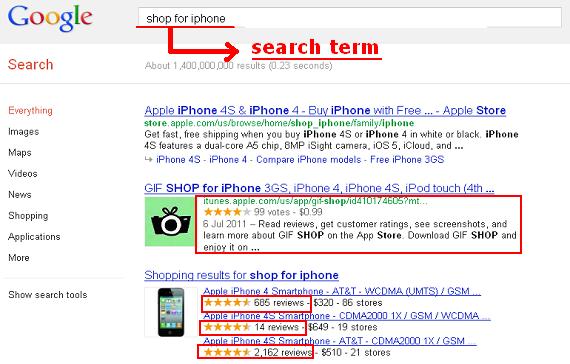
If you want, you can offer incentives (e.g. discounts, coupons, vouchers, etc.) on their succeeding orders to encourage them to give reviews. Then, you can mark these up with microdata to provide Google (and other search engines) clear context about your site’s content. Doing this also enhances click-through-rates since potential customers tend to choose links with the most reviews (see image). 


SEO For E-Commerce Sites

2. Place marketing videos
While producing these can take time, it helps greatly with your promotions. Additionally, they make product pages content-rich and link-worthy. They also aid with conversion rates, especially if you provide video demonstrations. Finally, they give your e-commerce site an edge against your competitors, particularly those who do not have this element.

As a tip, create a meta description and tag your videos. Most importantly, add related keywords to make them rank in search results.

3. Make a “Frequently Asked Questions” (FAQs) Page
This is a wonderful form of unique information for your website, especially if the queries come from interested or existing customers. It also lets you rank for long-tailed keywords and boost conversion rate, especially if you address a potential buyer’s questions.

4. Place social sharing buttons
The main reason for connecting your e-store to your networking pages is to give the consumers a chance to interact with you and their fellow shoppers. On the other hand, you can encourage them to share information about your business to their friends or groups. 


Also Read - Add Sharing Buttons
According to some e-commerce experts, you can add social media buttons to your newsletters or emails, so these will not appear distracting on your product pages. As a note, you have to ensure that the graphics do not hurt your page loading time. If they do, there is a huge possibility that possible buyers will turn away from your site, given that most users do not like waiting for a webpage to load. Plus, quick loading time is an important factor in algorithm indexing.

5. Provide search options
While some customers use your menu to find their way around your website, a few users prefer to type in their queries. This is when a search box comes in handy. To make this feature more effective, do not forget to place a product image to let interested shoppers have a good look at your offers whenever the results appear.

6. Add breadcrumbs

Breadcrumb SEO E-Commerce Site

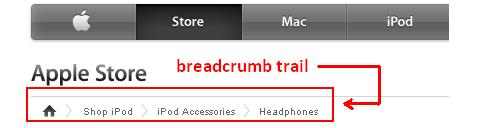
Are you familiar with the Grimm brothers’ fairytale “Hansel and Gretel”? Hansel dropped breadcrumbs on the ground, so he and his sister will not have a hard time finding their way back home. This is the concept of a breadcrumb trail on your site. Through it, you can help the customers navigate to different webpages and find their way back to the homepage easily. It also helps with internal page indexing.

7. Write UNIQUE product descriptions
There is an emphasis on the word “unique” because an original description sets you apart from the other retailers selling the same merchandise. Now, while you are writing these short details, do not forget to include keywords and prices. By doing so, you can help your products rank in SERPs whenever users search for these.

8. Put images
The good thing about placing pictures is that you are providing the consumers an initial look into your merchandise. Moreover, you can rank for image optimisation, especially if you create descriptive filenames with each word separated by a dash (-). You must also include an ALT text. In addition to these methods, you can create an image sitemap and then, send this to Google Webmaster Tools.

So there you have eight optimisation tips for your e-commerce website. Hopefully, this information can give you an idea on how to develop and design your online store. But if you think that you need more insights, you can always seek the advice of a professional Web designer.

About the Author: Emma Tomlinson is the Head of Retail at Smart Traffic, a Bristol-based fast-growing private technology company with a team of SEO specialists delivering solutions and services to many clients across the globe.
Read our guidelines to be a Guest Author at TechGau.Org

Tuesday, 19 June 2012

10 Reasons To Hire A Professional SEO Organisation

Getting Started
Whether a new business or a well-established one, you just are not getting the exposure you need through your online platform. You have heard about SEO, but do not have the time to read up and learn all you need to know. This is where a professional SEO services company can become your most important business partner.

Top 10 Reasons to Hire an SEO Company

1. Increased internet exposure will see you increase your return on your financial and time investment in your website. While you may see some results immediately, after two to three months you will see the biggest benefits.

Also Read - Get to top of Google Search

2. SEO takes a lot of time and effort. Naturally, having your business to run could see this as a non-starter for you, so using professional SEO services will enable you to carry on doing what you are best at.

3. Professional SEO services have unrivalled expertise in the field, understanding search engine algorithms and the many factors that will impact on whether or not your site will rank highly.

4. More people than ever are performing website searches. Professional SEO services will know the highly searched terms for your industry, and act on your site accordingly.

5. While SEO is not cheap, it can deliver far greater value than other advertising areas, such as print media and on television or radio.

6. The long-term effects of using professional SEO services will leave a lasting impression on your business. Say you work with an SEO for six months, when they leave your site does not automatically become stranded in cyberspace obscurity once again.

7. Using professional SEO services could make the difference between a customer coming to you or using a competitor. Whether it is local SEO or ranking higher on a keyword, if your customer can find you first then your chances of making a sale are greatly increased.

8. Professional SEO service providers know what search engines are looking for, meaning your site will be optimised to give them what they want, while keeping it user friendly at the same time.

9. Certain search engines may receive more searches related to your industry or niche market. Professional SEO services will be able to identify the best targets for directing qualified traffic straight to your site.

10. Professional SEO services will see you reach your online goals quicker than doing it yourself. We have already explored the time and effort SEO takes, so why put the rest of your business at risk by spending time on a practice you could get a pro to do perfectly?

Also read -
SEO Basics
What To Expect For SEO Company

Author:Bough SEO offers professional seo services to a variety of clients. Bough SEO has a wealth of marketing ability to help websites gain an advantage in their market sectors.Read our guidelines to be a Guest Author at TechGau.Org

Wednesday, 13 June 2012

4 Best Blogs for SEO Newbies Who Want to Get It Right

Most beginners in SEO (and many veterans, for that matter) just get it all wrong – and it’s not their fault, there’s just too much wrong advice out there, and most of it can seem legit to those new to the industry.

People tend to fall for “first place on Google in 7 days guaranteed” type of promises and pay for the courses that get them nowhere; and while a vast majority quickly decide that they can’t make money that way and quit, others stick to what they have learnt from IM superstar gurus, and end up spending a lot more than they’ve earned on other courses that promise similar things (if they earn anything at all).

The truth is, there is a way to learn to do proper SEO, but it’s slow and therefore unattractive to many. No short skyrocket course will teach you everything you need to know the proper way, but you can educate yourself: start with these blogs, they provide extremely valuable advice on the industry, and you will soon get a taste of what SEO is really about. Read a lot and do your own small-size testing and failure (and in the meantime, don’t quit your day job).

SeoMoz.org
This blog is updated daily by various authors and it covers basically every aspect of Internet marketing. This is one of the most authoritative blogs in the industry, and yet probably the one that is most accessible to beginners (if you don’t get intimidated by the amount of information there). The “Whiteboard Friday” is one of their cool trademarks (video presentations on a whiteboard). The articles are extremely detailed, with screenshots and step-by-step instructions, and they are usually written in a language that is easy to understand once you get used to SEO lingo.

SearchEngineLand.com
Search Engine Land has all the latest information from the search engine world. For over a decade Danny Sullivan has been a fantastic search engine reporter: he writes articles that are detailed and well researched, and since he’s maintaining a close relationship with Google’s engineers, his blog is a must read if you want to stay in touch with the constant changes in SEO industry.

PointBlankSeo.com
Jon Cooper, the 18 year old genius, is devoted to finding and presenting the top notch link building strategies: if you have no idea what other types of link building there are except from blog commenting, article directories and other highly non-creative and spammy techniques, this is the guy you definitely want to follow. He’s very enthusiastic about his blog, and he will probably answer any questions you ask in comments.

SeoBook.com
SeoBook is run by Aaron Wall, the first authority who wrote a thorough e-book on search engine optimization. They offer a training program which includes tools and a private forum (paid entry), but their blog (free) is full of useful information and tips from top SEO experts.

While this list may be too much for start, it is full of excellent read on SEO. You can pick one or two to go through in more detail, and subscribe to others for getting the latest posts. Invest your time in exploring quality resources, apply what you have learnt from them and you’ll do fine.

Some Articles You May Like -
SEO Basics
Powerful SEO Tips
Common SEO Mistakes
Free SEO Tools
Getting More Traffic To Your Blog

Author: As a SEO expert, Jeff knows how important it is to learn as much as you can about SEO from trusted sources before you start doing SEO for yourself or for a client. Curently, he is associated with Sadrzaj serija as their consultant for search engine optimization and social media marketing.

Meet the Author

Gautham A S

Gautham A S is a personal tech columnist and blogging expert at TechGau.Org, one of the leading Tech, How-To and Blogging Tips blogs