Friday, 29 June 2012

Blogging as a PR Tool

Blogging as a PR Tool
Using a blog for PR can be very effective, if you know how to do it properly. However, there’s more to blogging then just typing out a random post once a week. The content needs to be relevant, interesting and engaging. It also needs to be useful and grab the attention of the audience. In order to do this, you need to know who you’re writing for. You should personalize the content for them and make them want to share it with their like-minded networks. Here are some more suggestions to help you blog better.

1. Make your posts news worthy
Traditionally, PR people would have to hound news people to get their press release into the mainstream media. The digital age has flipped this around. If you write strategically, you can bring the press straight to your client via your blog. According to Mashable.com, news media don’t only rely on traditional wires anymore. They’re constantly on the look out for new stories on the Internet and, if you play your cards right, a blog post can be considered news worthy. If written carefully, it can morph into a press release. A pre-published draft post, when shared with reporters under embargo, can even be considered a legitimate news source (Mashable.com). Interesting and well-written content, combined with short, punchy headlines (which can be easily shared via Twitter and the like) could effectively turn your blog into a news-wire.

2. Make your posts share worthy
Every digital PR dream is to go viral or, at the very least, get significant retweets. In order to achieve this, Mashable.com suggests that blog content should be less about the client’s product or business and more about the culture that surrounds it. In other words, it needs to be about what the client’s target audience is interested in. To get this right, you need a clear picture of exactly who will read the blog and what kinds of topics they will want to read.

Also Read - Floating Share Buttons For Blogs

You can get creative; post how-to advice, have experts in a related field guest post their wisdom or post links to interesting articles. If the target readers like what you’ve written, they’ll want to share it with their social networks. Mashable.com recommends that you have the appropriate sharing plug-ins on your blog pages. A Twitter and Facebook button is standard and if your content is aimed at a professional network, then a LinkedIn button is needed. If you want to go viral, Reddit or Digg could do the trick. However, you need to keep it simple; don’t have more than three share buttons.


3. Make your posts visual
Well-written content is gold, but an interesting video post can make your blog come alive. It can make it more personal and real, as video is often seen as more authoritative than text. These days, it’s easy to capture video: you can use a smartphone or a digital camera. You can also easily upload videos to YouTube via apps. Mashable.com suggests that your videos be between 30 and 60 seconds, so you need to keep to the point. You can encourage your client to be filmed while at events, or just around the office.

If you follow these suggestions, your blog can be a great PR tool. You can get a message across just as well (if not better) through video, so remember to incorporate some visual elements into your blog from time to time. Well-written and targeted content will bring the right people to you, and if you regularly write relevant and interesting posts, they will keep coming to your blog – and they’ll spread the word by sharing it.

Author: This post was written by Ang Lloyd, a freelance writer based in Cape Town, South Africa. Ang relishes the challenge of writing on a variety of topics, including the value of PR blogs.

Thursday, 28 June 2012

YouTube as a Marketing Tool

Video-sharing websites were virtually nonexistent until YouTube exploded onto the scenes in 2005. Ever since debuting, millions of users have started using the website to connect with family, friends, and more recently, customers, clients, and readers.

Nearly all big name companies have Facebook, Twitter, and YouTube accounts that allow the company to better relate to their fan base while attracting new customers. For example, one of the most popular YouTube company channels is Home Depot. While the company itself sells home improvement and construction products, the YouTube channel serves as a 'How-To' tutorial to help better guide customers on the proper way to fix or remodel their homes.


Many non-customers take note of how simple the video instructions are, and see that Home Depot has all the products needed. Since the video has provided the potential customer with new knowledge, the individual is more likely to remember Home Depot at a later date when their services are needed. This helps to bring in even more customers, all by simply uploading a few short videos. 

Increasing Traffic to Websites

The same tactics can be used for anyone who is looking to increase traffic to their website. Creating a video blog (vlog) means that new readers will stumble across the video. Website owners can then direct the viewer to their website by mentioning the name at the end of the video. If that isn't enough to bring in traffic, a link can also be added to the description of the video for easy access. 

YouTube also offers a 'subscribe' option which viewers can use if they would like to follow the videos on a long-term basis. This option will alert subscribers too all future videos so they can remain up-to-date on the events regarding the website. Since all vlogs tell a story, users are far more likely to come back wanting more. This leads to long-term steady traffic.


AdSense Earnings

Also Read - How To Get Approved For Adsense

Once a YouTube video has earned enough views, website owners can begin making a passive income from their channel. This is done through a partnership with Google AdSense and YouTube. In order to qualify, a video must be a completely original production. This means that all vlogs qualify as long as no copyrighted music or other content is included.


If the user accepts the agreement, a small advertisement will be placed on the bottom of the YouTube video. These advertisements are usually related to the video, though in some cases they may be complete random. Each time that the advertisement is clicked, the video owner will be paid a small cut of the profit.

Each click the advertisements receive only pays a few cents, but if the YouTube channel is popular, this can add up significantly over time. There been several instances where a single video goes viral and the uploader receives several thousand dollars due to AdSense. While this isn't typical, a large fan base will provide a steady income over a long period of time. Since Google AdSense never expires, users will continue to earn money as long as their video is being viewed. 

While YouTube is an enjoyable place to watch videos, it's also a unique marketing tool which can lead to long-term traffic and a steady income. Since uploading a video only takes a few minutes, all website owners who are looking to increase their fan base should create their own channel and start advertising. 


Author: JR Olson write on behalf of accountant.org who can manage your business expenses while you reap the benefits of YouTube marketing.

Wednesday, 27 June 2012

General Guidelines for Selling Stock Photos

Nowadays, anyone who has a passion for photography can make money selling stock photographs. The following are some tips for success in stock photography

1. Understand the process
Microstock companies such as 
Depositphotos, Jupiter Images, Fotolia and iStock Photo sell inexpensive stock images, videos, animations and illustrations submitted by various amateur and professional artists. However, the membership and technical requirements vary from one company to another. Once you have signed up on any of these sites, you can then begin uploading your photos. The photos which are accepted will be included in the site’s stock inventory. If someone buys your photo, you are paid a commission.  


Learn other ways of Making Money Online

Many people have the misconception that selling stock photos is a way of making easy money. However, it takes a lot of time and effort to create a significant portfolio of photos before you achieve any meaningful profits. In addition, payment systems vary from one company to another. Usually, it is either a low flat fee or a commission anytime your images are bought. You have the liberty to submit your photos to different agencies. If your work sells well, an agency might offer you an exclusive contract, meaning that you can only sell your images through that site. 


2. Submit designer-friendly images
Take time to think about where your photo could eventually end up. It might be a marketing brochure, a website, a restaurant or a print publication. In many cases, your images will not be used as they appear. Buyers are likely to crop, manipulate or dissect images acquired from microstock agencies. You should therefore make sure your images are something which can be worked on by a designer


Usually, designers look for photos which have lots of space which can be used to add text. You need to make sure that each of your photos has a minimal number of elements. Unless they are an important part of the image, things such as passers-by and vehicles should not appear in the background.  


However, you need to remember that microstock buyers are not necessarily seeking fine art. The fact that an image is beautiful does not mean that it will sell well. Go for simple, utilitarian photos which are focused on a specific theme.     

3. Do your homework
Find out what subjects the microstok company is interested in, what their technical requirements are, and what kind of images sell best. Since they receive numerous submissions on a regular basis, agencies are usually very selective about the images they accept. One of the best places to begin is the FAQ section. 


However, since requirements are always changing, you might not get all the information there. To stay abreast of trends, observe the moods and styles of the current popular images. Regularly add relevant and fresh images to your portfolio so as to ensure a constant flow of income.

4. Take care of legal issues

Regardless of its quality, an image which is not 100 percent legal won’t be accepted by any agency. Make sure you sign model releases if there are people appearing in your photos. This applies to professional models, as well as your family and friends. In addition, you need to scan your photos for any trademark violations. You are not allowed to have trademarked symbols, logos, sculptures or paintings in your photo’s background. Easily recognizable landmarks and products should also be eliminated or avoided. If the problem is minor, it can be easily dealt with using Photoshop. 

5. Learn to overcome rejection
When starting out, it is highly likely that very few of you photos will be accepted. This should not discourage you into giving up. Instead, find out what you need to improve in your images. Some agencies will immediately explain the reasons why your photo was not accepted. If they don’t, take the initiative to ask for feedback. 


Also Read - Why Not To Use Generic Photos

Author: Charles Mburugu is a professional blogger who likes sharing tips for internet marketers. Currently, he is writing for a blog which offers Jupiter images promotion code and review for istockphoto. He also writes about social media and blogging tips.

Basic Windows 8 Interface

Basic Windows 8 Interface
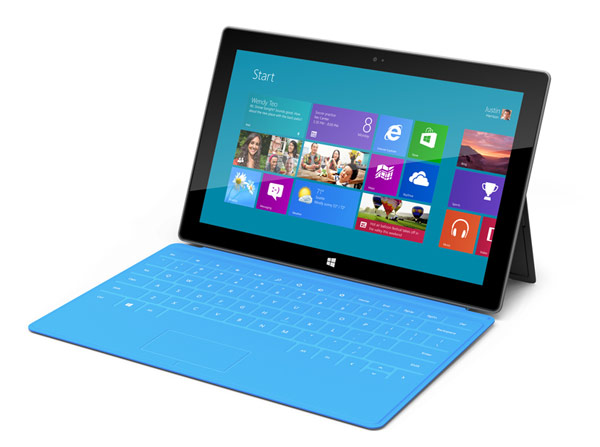
Microsoft’s Windows 8 has not been released to the public yet, but it’s been making lots of headlines lately. Many people were amazed at the promotions of Microsoft’s Surface, their very own tablet.


Also Read -
Things to know before upgrading to Windows 8
System Requirements For Windows 8

Of course, Microsoft has made a living with computers, so it’s no surprise that Windows 8 will be released on that platform.

Basic Windows 8 Interface

That being said, should you be excited for Windows 8? Is Windows 8 even worth it at all? With so many computers still running on Windows XP (it’s over a decade old already!), it looks like Windows 8 may have a hard time converting older Windows users.


Selling your laptop for Windows 8 looks like a good idea at this time, because it needs some serious firepower. If your laptop doesn’t have power, you’re just not going to get it to work.
So what does Windows 8 have anyway?


Metro
Metro is probably the most advertised feature of Windows 8. If you’ve seen their Windows Phone, you’ll notice that the start page has square tiles where information is displayed and shortcuts to apps are easily accessed. This is called Live Tiles for Windows Phone, and Metro for Windows computers.


As the name implies, Metro is a station where all of your favorite stuff can be pinned for quick access. You can pin a frequently emailed contact for instant messaging, or you can pin certain websites for instant access when you fire up your computer.


You can also pin contacts for easy communicating such as chat or email. Basically, Metro works like widgets for Android. Information is displayed, such as unread emails and weather.


It’s a totally useful interface you’ll really like. Of course, you can switch to the traditional desktop view with a quick click in the corner.


Funny Unlock Screens
These days, unlock screens are being challenged to be more creative. In smartphones, you can jump straight to other apps!


With Windows 8, Microsoft takes a very unique approach to the subject with picture lock.
Picture lock works by choosing a photo of your choice. Once you’re done with that, you are required to make three gestures to unlock the screen. It’s really cool! You can draw a house beside a picture of a tree or do other stuff. You need three gestures to enter.


Of course, you’re also given traditional ways of unlocking your computer. You can enter a password or type in a PIN.


Picture lock though, is definitely one of the coolest things Microsoft has come up with.


Charms
Charms is a small menu found on the right that you can bring up when you need something done. For example, if you need to search for a file, you can just bring it up. Charms also gives you access to settings and other system related functions for easy access. It’s like the taskbar of Windows.


Conclusion
These three basic interface features will surely bring out the fun when it comes to using a computer. Microsoft has finally found a balance between practicality and aesthetics when it comes to creating cool software.


When Windows 8 comes out, it’ll be everyone’s favorite.


Author: Mikaela Taylor is an aspiring blogger and now content writer for Cashforlaptops.com – where you can sell your laptop while at the same time reducing tech waste.

Tuesday, 26 June 2012

7 Tips for Freelance Writers

Freelance writing is a great way to be creative and make money at the same time. There is a large demand for freelance writers, both on and offline, and the key to success is content and speed. These two factors often tie in together, as it is quite easier to write about something you know about, rather than something you do not. The following seven tips can help people begin their career in this lucrative field.


 Freelance Writers

Choose Your Niche

When you write about something you know about, you will eliminate the need for extensive research, and you will be able to write much faster. You may have to add sources to back your claims, but you can always do that later. You do not have to choose just one specialty either. If you have knowledge and expertise in several areas, you may wish to choose several niches.

Practice Your Typing

If you can type faster, you can finish your articles faster. In this way, you can get more accomplished in one day's time. If necessary, take a typing or computer course. There are even some typing tests and exercises online that can help you sharpen your skills.

Hire Help

If there is something that you simply have a hard time doing such as interviews or research, pay somebody else to do it for you. Of course you may only be able to do this if the piece you are writing is going to pay well enough to hire someone. However, if it is a high-paying piece, save yourself time and delegate help.

Use Sub-Headings

Sub-headings not only make pieces easier to read and more attractive, but they make it easier for you to write the article as well. This is because you do not have to think up any transitory phrases to move from one paragraph to the next. You simply need to think of a good sub-title, and you can move right on to the next point.

Limit Your Research

While it is definitely not a good idea to not research an article, it can also be a bad idea to over-research. Conducting too much research simply takes up too much of your valuable writing time. A general rule of thumb is to conduct about two interviews or use two sources of information for every 500 words of content whether you are writing for an HVAC company or Etobicoke moving storage company.

Too many writers waste valuable time conducting lengthy interviews, and sometimes, they only obtain a minimum of information due to talkative interviewees. With that said, let your interviewees know ahead of time that you are on a strict schedule, and if necessary, tell them that you have another interview scheduled within the next hour.

Make Use of TK

TK is freelance writing slang that stands for "to come". It means that you will add information later. For example, if you are stumped for a word, phrase or source, simply jot down TK and move on. This will save you time, and you can go back later when the word, phrase or source comes to you.

Freelance writing has grown quite popular today, and there are terrific opportunities both on and offline for people who love to write. However, if you want to succeed, you need to focus on content and speed. The above useful tips will help you strengthen these areas and succeed in your endeavors.

Also Read -
Become a Good Freelance Writer
How To Write About Stuff You Don't Know

Author: This article was written by Philip Russell. Philip has spent many long nights at the keyboard putting together all sorts of different freelancing jobs. It's a tough job, but it can be done, and you can save a lot of money on gas and logistics if you just stick to working at home as a freelancer.From Etobicoke moving storage company.

Tips for Choosing the Best Computer Accessories

When it comes to computers, accessories are a very important element. Some people use accessories make their work easier, while others use them for entertainment purposes. For instance, you might want to buy external speakers to improve the quality of sound from your desktop. Or you might want to get a separate mouse to use with your netbook. 


Also Read - Computer Spec For High End Usage

There are different types and brands of accessories available in the market. Before visiting the computer shop, you need to know exactly what you are looking for. One of the factors which will greatly influence your decision is compatibility. You need to find out if the accessory is actually compatible with your computer system. Usually, the accessories for a laptop or netbook are different from those designed for a desktop PC, and vice versa. Therefore, it is very important to find accessories which are suitable for your type of computer. Be wary of manufacturers who guarantee that their product will be compatible with your computer, only for you to find out later when you test it that it isn’t compatible.   

   
Desktop computer accessories
Desktops are the most common types of computers found in homes as well as offices. Desktop computer accessories, which are usually inexpensive, are available in different brands. Since desktop computers are normally positioned at a specific place and are rarely moved, it is advisable to go for the lower-priced low portability accessories. It does not make sense to buy a portable and costly accessory for your desktop, and yet it will remain at the same position. Some of the accessories which can add value to your desktop include internal or external TV cards, wireless mouse and keyboard, high base speakers and woofers, and screen protectors. 


Laptops accessories
Laptops have become very popular with users who would like to access their computer anytime whether at the office, home, on vacation or on business trips. Since laptops are very portable devices, they also require portable accessories. Some of the most important accessories for a laptop are cooling pads which help to keep the temperature of the laptop low, and a wireless mouse which is much easier to use than the built-in laptop mouse. Another essential accessory is the micro USB hub which provides more USB ports which can be used to attach more accessories to the laptop. A wireless TV card would come in handy for anyone who would like to watch TV on their laptop. You could also consider getting external hard drives to increase the storage capacity of your laptop. Using an external hard drive will keep you from filling up your laptop’s hard drive with too many files and folders. These drives vary in size, and can have a capacity of up to 500GB.
Besides these accessories, there are other decorative accessories which can be used to make your table more attractive as you work on your laptop.    


Also Read - Best Laptops For Professionals   
    
Tablet PC accessories
Tablet PCs are the most recent personal computers which are getting increasingly popular. Due to their small size, they are easier to carry around compared to laptops. Whereas a laptop requires a bag or case to carry it around, the tablet PC can be easily carried around in one’s hands. Though tablet PCs come with many useful accessories, they still require a few extra computer accessories. Since the touch screen system might be easy to use, you might need to buy an external keyboard. A HDMI cable will make it possible for you to view your movies, videos and photos on a big screen. Another accessory which is essential is a cover or case to protect your tablet.   

Author: Charles Mburugu is a professional blogger who likes sharing tips for internet marketers. Currently, he is writing for a blog which offers coupons hp printers and skinit.com coupons. He also writes for blogs such as TechGau.Org.

Monday, 25 June 2012

The Safest Storage in the World

The Safest Storage in the World

Secure storage has become a necessity for users who work with considerable volumes of data. Multinational corporations, small business owners and even personal photo collections all require storage solutions that can safely protect all types of data. As data volumes continue to grow, there has been a gradual shift in recent years from physical, local storage to offsite storage solutions.

Also read - Best Cloud Storage Services

Traditional Storage Solutions

For years, computer users have relied on trusty hard drives for their storage needs. A local storage solution, users can easily save and manage data on a hard drive and, if the data needs to be copied to another device, transfer to an external hard drive or external media. The business approach to data was very similar. Although business users typically shared a network and storage servers were used, the approach was the same. All data was managed, accessed and backed-up internally and locally. It has only been in recent years that
offsite storage has become more of an attractive solution due to the increasing restrictions of local storage.

The Disadvantages of Local Storage

As technology became more mobile, the restrictions of local storage became more obvious. With tablets, mobile phones and laptops, users need easy and secure access to data across multiple devices, different platforms and from different locations. Local storage simply cannot meet these needs. The implications of massive storage failure are also particularly devastating. Whether it is human error, technical problems or even an environmental disaster, it can be a lengthy and time consuming process to restore back-ups and resume service from local storage.

New Storage Solutions

The two main types of offsite storage are cloud storage and storage facilities. Cloud storage is a service that is typically offered by a third-party provider whereby users can upload and download data via the Internet to and from a remote server. Rather than saving to a local storage device, the data is transferred and managed on a server. Cloud storage offers users secure flexibility as they can manage and transfer data from any device by securely logging into the cloud server. Cloud storage is mostly used for personal use, although it is practical for some types of businesses.

Offsite Storage

Offsite storage has similar features to cloud storage. Data is still transferred via the Internet to a remote server. However, offsite storage is used primarily to back-up data. With cloud storage, users may upload and manage files on a day-to-day basis. Cloud storage is typically used as a hard drive that can be accessed from anywhere. Offsite storage is for backing-up sensitive and pertinent data. This process is called e-vaulting.

When the data is transferred, it is stored by a third-party offsite storage company. Security is precedent in these facilities. They are usually located in remote places that are patrolled by security teams. The data is stored and maintained on servers that are housed in purpose built vaults. This is why businesses rely on third-party companies for offsite storage; they not only securely protect the data from theft or damage, but they also have staff that run regular checks to ensure the integrity and performance of the data. If a business has a crash or error and needs to restore critical data, the offsite storage company can reload the latest backed-up data from the servers quickly and efficiently so that the user suffers from as little downtime as possible.

Offsite storage can also be used to house physical items. Some companies may have files and records that they need protecting and these too can be stored in purpose built vaults. These vaults maintain optimal temperatures and humidity to ensure that they do not suffer any long-term damage. These third-party storage companies have even been trusted by governments to store highly confidential documents and files.


Offsite storage is by far the safest storage method available. Data is backed-up and stored in high security facilities. Access is strictly prohibited and the data is checked and maintained by professionals. It is easy to see why more and more users are relying on offsite storage as a long-term and effective solution to their storage needs.


Author: Nathan from offsite storage.

VPN Server Logs: Who Keeps Them?

Internet privacy doesn't hinge only on having secure communications. You also need to make certain that the records of your communications are not retained. Some VPN providers do retain server logs. Others do not. There are different methods you can use to make your server logs as inaccessible as possible. If private browsing is a major concern for you, there are tactics that you can use that go beyond the technical in nature.

Logging and Retention
For privacy enthusiasts, any VPN provider that keeps logs is automatically disqualified as an option. If you're worried about people not being able to track down what you are doing online, you'll need to go with a provider that either does not keep logs or that only keeps them for a very short amount of time.
One of the easiest ways to get some peace of mind about server logs is to go with a company that offers unlimited bandwidth plans. Generally speaking, most companies that do retain logs only keep them to determine how much bandwidth users have gone through. If those users are on metered plans, the provider needs to know this information so that they can tell when their usage has expired for the month. There's no reason to keep server logs if you have unlimited access. Your VPN provider's policies will be detailed on their site.

Server Ownership
Some VPN providers offer servers located all over the world. Obviously, one would have to be pretty credulous to believe that the company actually has employees located all over the world attending those servers. The servers, of course, are contracted. If you're truly worried about security, you'll want to look for a company that owns all of its servers. This is a way of ensuring that the company's security policies are applied consistently across all of its servers.

Jurisdictional Layering
Jurisdictional layering is a tactic for obtaining Internet security that shares some features in common with having a foreign bank account. By utilizing a VPN service located in a nation that does not cooperate with the law enforcement in your own nation, you can avoid having lawyers subpoena information about your traffic logs, if the company even keeps them.

The popular nations for jurisdictional layering include Russia, Ukraine and Panama. In addition to the fact that VPN operators in these nations aren't likely to be concerned with a demand for server logs by any agency outside their own nation, there are language barriers that make it very difficult for lawyers and other legal authorities to get information from such providers. For businesses that want to maintain the highest levels of security for trade secrets and other information, jurisdictional layering is oftentimes a useful tactic.

Mind the TOS
Every once in a while, you may get an e-mail from your provider letting you know that the terms of service agreement for their service has changed. You need to read these. The reading is oftentimes tedious and is about as exciting as is reading any other legal document is but, because the change in the terms of service may affect logging policies, you need to know.

For most users, a VPN provider that doesn't keep logs will provide adequate security. There may be cases where law enforcement could compel them to keep logs as part of an investigation, but this would be on a case-by-case basis. If you're truly worried about being able to keep your logs private, the best option may be to go with a provider located in a nation that doesn't cooperate with law enforcement in your home nation. The Internet is a global medium and, if you're smart, you can utilize that global nature to give yourself enhanced privacy on the Internet.

Author: Michael Maxstead is a big fan of VPN and provides in depth information and reviews on hiding your IP address.  Visit VPNReviewz.com for more information on how to use VPN and choose the right service for you.

Sunday, 24 June 2012

3 Performance Tools You Need To Build and Maintain Website


Need to build a website, edit an existing website or enhance your websites look and feel? I came upon one company on the web that has the universal solution, especially for those on a tight budget. Known for their famous slogan, “It’s just that easy…” because it really couldn’t get any easier, Easy WebContent gives users of all ages and technology level the ability and power to keep their web presence up-to-date and competitive without the help of a professional.

For small business owners, especially entrepreneurs working on startups know that time is money and vice-a-versa. With this said, the time spent on Google for web designers, developers, html editors, and widgets can go beyond the marketing budget set for developing a web presence. Think about it, the project quote that your selected designer gives you may be around $3,000. Now, think about the time you spent asking for quotes and the number of designers you spoke on the phone or in-person prior to your final decision, add a few hundred dollars to that already $3,000 from the additional time spent. Time is surely money, so here is your one-stop solution for your website needs.

Make A Website With A Site Builder
Honestly, with a tight budget why go to a developer or designer when there are so many site builders on the web like Squarespace, Weebly, and Yola, just to name a few to build a website. They all have their advantages and disadvantages; from free to paid builders and basic to elaborate capabilities. From my own experience with the Easy WebContent Site Builder is that it is by far the most basic of their competitors. The tool provides fully customizable themes with elastic control, a fully drag and drop system as many site builders do, the capability of embeding custom HTML for those who have some knowledge of coding, and stats to keep traffic of your web traffic. 

The users that would have the advantage from this tool are small businesses, startups, and local to nonprofit organizations. Those who are expecting a more elaborate website, you may just consider hiring a web designer and developer, but fair warning they will come with a high price tag.

Edit Your Existing Website With An HTML Editor
The Easy WebContent HTML Editor is by far my favorite tool of the three. The advantage of this particular HTML editor is that it answers that famous question, “How do I edit my website?” The beauty is you don’t need to download any software or use expensive third-party tools to make any edits. This online HTML editor allows you to do your edits anywhere in the world on any computer using all types of browsers.  From a designer’s perspective, I can develop sites for my clients and give them the power to be in absolute charge of their content through the Easy WebContent reseller program. From a user with an existing website perspective, I don’t have to hire a developer to make minor edits.

Add-ons
Enhancing your web presence sometimes goes beyond that elaborate look and well-written content. Many visitors looks for a sense of interaction when landing on a website, may it be a carousel of product images or company announcements on the home page of a website to a gallery of images on a portfolio page. Whatever your business is, interaction is key to keeping your visitors engaged. Therefore, I found that Easy WebContent provides add-ons and widgets that enhances a website with photo galleries, flash players, event calendars and much more. These add-ons and widgets are included within their site builder and HTML editor, but are also available as an individual tool just as if you are just looking for an event calendar for your site. 

Your One Stop Web Shop
Let’s face the reality, sitting in front of a computer can become extremely time consuming and it is worth more than a couples dimes and pennies. Through my own experience using these tools, I definitely recommend them for those who are on a tight budget and just want a basic website. This is a great start and if anything, down the line when you are ready to put in a couple hundred or thousands of dollars to upgrade your website then start searching for designers and developers. 

Saturday, 23 June 2012

Ways To Market Your Company on Facebook

The importance of marketing cannot be emphasized strongly enough. As a result, many businesses have their own marketing department, which will take care of advertising, market research and other promotional activities. If a company and its products or services are not properly marketed, then the chances of people getting to know about them are limited. As a result, sales will also be limited, and hence a business may vary likely risk to close down eventually.

The Importance of Online Marketing
There are countless marketing methods used by businesses. Lately, the internet has dominated these marketing endeavors, as many more people can be targeted online nowadays. As a result, there are several internet marketing techniques that one can make use of. Social networking sites are some of the most effective and popular possibilities. This is mainly due to the fact that many people nowadays make use of such sites on a daily basis. Facebook and Twitter are the most popular ones. Many businesses set up their own page so as to attract loyal customers and prospective, new customers, to join them. Let us discuss some ways to market your Facebook company page.

Also Read - Tips For Social Media Marketing

Facebook Company Pages
Thanks to a Facebook page a business can practically have a secondary website. The best thing about it is that updates, such as news, feeds and posts, will be automatically uploaded to the friends' walls, if they have joined the page. Hence, the effort is not to remind people of the company, but rather to have people get to know about the page, and entice them to join it.

Advertising on Facebook
In order to do so, there are quite a few methods that can be put into practice. The easiest one is to advertise on Facebook itself. This can be done by paying for an advert that will be shown on one side of the screen along with a few other adverts. It is very important that such an advert is made to be as appealing and as eye-catching as possible. The more it stands out, the more people will be made to click on it. Upon clicking, they will be led to the company's Facebook page, which should also be made equally appealing, so as to encourage them to join. Links should also be placed on the company's website, and on any related forums or blogs.

One of the drawbacks of Facebook adverts is that they are small, and so the content has to be very limited. Therefore one should choose an innovative visual aid, and a few interesting words, so as to make an impact. Having said that, Facebook provides the possibility to target a niche market with the adverts. Thus, you will be able to specify the types of clients that will be more attracted to the firm and its products or services. This could be a geographic, gender, age or other preference.

Mention Your Facebook Presence in Other Advertising
Besides making use of these adverts, it is also crucial to make sure that you include the Facebook sign in any merchandise you have and in any adverts you make on other media. So, if you are printing a brochure, a leaflet, or an advert on a newspaper or magazine, make sure that you mention that you are present on Facebook. Encourage viewers or readers to look up your page and join you.

This practice should be given importance in various activities. You should also try to include this fact on the product's packaging or label if possible. If you have any merchandise, you should also try to include it.

Competitons and Promotional Ideas
Another effective way is by introducing promotional ideas that will attract more visitors. Common methods include competitions where those who join will get in the chance of winning something, or else distributing vouchers or attractive discounts to all your followers. These methods are gaining a lot of popularity since many people tend to join a page so as to receive something in return.

Interaction is Key
It is also a good idea to encourage those who join to share your links, photos, videos and other uploads with their friends. The "like" and "share" possibilities on Facebook should be made use of as they can be a very effective way of increasing your views, and as a result getting more people to join your page. It is also important to link your page with other companies' pages which are in some way related to your line of business. In such a way, their friends, may eventually also become your friends.

By making use of these ways to market your Facebook page you will manage to increase your followers quite easily. The key is to be innovative and to make use of effective methods and propaganda techniques that can attract people's attention.

Good luck to all with their Facebook marketing efforts!

About the Author :OnlineClock.net are the creators of the world's most popular web-based alarm clock. True to the words in this article, they invest a lot of time in marketing the Online Clock Facebook page. Take a look at their Facebook page to see a live example of Facebook page marketing in action.

Top Tips for Using Your Webcam


The range of webcams available is massive and can get confusing. So knowing what your requirements are and what the most desirable qualities are in your webcam is a great place to start.

Tips for Using Your Webcam

Basics
Keep your budget it mind. If you’re using the webcam for online calls, no programme is going to deliver absolutely perfect video over the internet, as bandwidth becomes a factor. Excellent-quality webcams can be purchased relatively cheaply, and unless you have particularly high demands you probably shouldn’t spend more than £40. For absolute functionality you can easily drop below £15, or throw caution to the wind and pick one up on eBay for a song.

Resolution is key with a webcam: realistically, the item’s number of pixels will certainly provide better still images, but isn’t all that useful for video. Even cheap cameras can provide 1280 x 720, so don’t settle for less. Extra features can also be useful if you’re working in a limited-space environment, such as pan/tilt functions or manual focus. Ideally, before making any important calls you should experiment with the settings on your camera, to see what works for each particular instance of use.

And most basic of all, make sure your machine can run the webcam! This is almost a given with any recent computers, but if you’re operating an old machine, 1GHz CPU and 512MB RAM should be enough.

Presentation
Once you’ve got your cam installed, it’s a good idea to check up on what settings work for you. If you’re making business calls with your new tech your first impressions are going to go a long way, so ensure the lighting and sound are up to scratch. If you’re sitting at your computer, the light from the screen can be harsh and send shadows in odd places that can make you look like a hacker villain from the 90s. Also be sure to keep the background uncluttered: everything that appears on screen sends a message about you and your business, so make sure you’ve got things in an appropriate state!

Also worth bearing in mind is that sitting too close to the camera can cause distortion and a fish-eye effect that changes how your nose appears. That may sound silly, but not nearly as silly as it looks. Wearing all-white is also discouraged, unless you’re very confident about the quality of your lighting, as white can cause flare, which distorts the video.

Other Uses
If you’re an enterprising soul you can use it as a makeshift security camera, though practically speaking it’s probably more hassle than it’s worth. Otherwise you can use it to participate or host webinars, a great way to teach a class, particularly if you need to use visual elements as part of the class. This is on top of producing any how-to or introduction videos necessary for your product or service, or placing a free call to clients.

So webcams can be a highly valuable addition to your business, and relatively simple to install and operate, and with a few useful tips, can look very professional indeed.

Author: Catherine Halsey is based in Edinburgh and writes for a digital marketing agency. This article links back to Skype.com.

Why Did Google Buy Meebo?


Google, the home page for most of us has generated a directory of responses, whenever needed. This ability of the search engine has made us look up to it even for the smallest of things. They say, ‘if it’s not on Google, it does not exist’. This indicates the extent to which people rely on Google.

Incorporated in the year 1998, it was put to action in 2004 with a mission to systematize every bit of information available and make it universally accessible. The company has acquired many business firms since 2001 and its prime focus has been acquiring comparatively smaller companies like Keyhole Inc. which developed a product named Earth viewer. Google renamed it as Google Earth (after acquisition) and released it in 2005. Several other acquisitions followed with the latest one being the acquisition of Meebo.
Meebo is a social medium, which helps users connect with their interests. Headquartered in Mountain View, California, it started off as a browser based IM program (Instant Messaging) which supports various Instant Messaging services like Windows Messenger, Facebook chat, Yahoo! Messenger and much more.

MeeboOne of the sensational products of Meebo is the Meebo toolbar. It allows the publishers to make use of the massive user base to furtively promote their brands on a user’s webpage. It also allows the users to create their own web experience with things that matter the most to them. You create a profile with inputs of your favorite stuff and Meebo will make personalized content according to it. You can also improve the personalized content by reacting to it with an emoticon (happy, sad, frown etc). Meebo will also sort out all web experiences that you’ve shared into a theme for others to enjoy.

Google might have acquired Meebo to enhance the services of Google+. This could be a wise move because it might help Google to spread its wings further in social networking. One of the sources reveals that Google is always on a pursuit to enhance the way in which users share content and connect across the Internet.

Meebo also seems to be very excited about this integration. It has posted on its blog that they have been assisting publishers to get more interactive with the users and on joining hands with Google, they are super thrilled to start the journey towards the next milestone.

The financial terms are still kept confidential, though several rumors have already started. When two forces combine together, we can expect something phenomenal. And as far as this coalition is concerned, we can anticipate something better and much engaging.


Also Read - Facebook Acquires Instagram

Author:This is a guest post by Mark Dwayne of buytimewarnercable.com, a site that offers savings and current information on buytimewarner.

Friday, 22 June 2012

What to do About your Webmaster Tools Warning?

Recently Google has heightened its monitoring of possible violations among its Webmaster Tools users and are notifying website owners of the issues. In fact, you may have received a warning from the company notifying you of a possible violation.


Also Read - Google Penguin Update

What does this mean?

Depending on the warning, it could mean several things.According to Google, it has discovered some manipulation of web content to help pages increase their PageRank, which results in those pages appearing higher in Google's search engine results. Called cloaking, the technique involves a site serving a different version of a web page to search engine spiders - one that is different from what users see.


Google frowns upon this practice, since it lures people to sites under false pretence, based on search results that may not display the desired content. In an effort to improve the quality of its search results, it has begun notifying possible violators and threatening to remove their sites from its search results.

Unnatural Links

Another technique that is getting flagged is unnatural links - links that webmasters buy or exchange with other sites to boost page rankings. Part of Google's PageRank is based on the number of links that other sites create to content. Some people buy links or exchange links with other sites simply to increase that number - even if the two sites have no relationship or no common purpose.

Also Read - Key To Natural Link Building

Google has caught on to that practice as well, and part of the new crackdown on violations centers on link exchanging. Websites that have a great number of links to boost their search engine rankings will be removed from page results.

What to do about it

So what do you do if you are notified? In the case of cloaking, the solution is simple: Remove the offending content from your site. In some cases, you may not have created the content or even known about it, which means that someone else may have gained access to your hosting account. Talk with your hosting provider to locate the content and see if there are any security lapses in your directories. Also, take measures to further secure your login. Once you remove the content, you can resubmit your site to Google for reconsideration.
As for the unnatural links, the answer is to let links to your content develop naturally - if you have useful content, third party sites will add links to your site. This more organic approach will not be noticed by flagged by Google and will give you the PageRank needed to optimise your search rankings.

You may also want to revisit Google Webmaster Tools' Guidelines, which outline best practices for your content.

So what is the key to search engine optimisation? Good content. Focus on keywords throughout your real content, and don't try to trick Google. They'll know.

Also Read - Keyword Development Plan

Author: Jacob is an Online Marketing expert from Sydney, Australia. Some of his newer clients had received the Webmaster Tools warning due to poor link building activity from other companies. Jacob has since cleaned up the problem and will continue to do the right thing by Google for all of his clients.Read our guidelines to be a Guest Author at TechGau.Org

Why the Internet Will Never Kill Television

The way that we consume media has changed dramatically over the last decade. For me, the first real change that proved that there were other commercially viable ways of distributing media other than by cathode ray tubes was BBC iPlayer.


Developed by the people from the murky world of peer to peer software Kazaa, BBC iplayer has a winning combination of quality content and an easy to use interface. Making watching television accessible for all on a computer for the first time. Since it was first introduced, iPlayer has become a medium unrivalled by other commercial stations. Surely the end of the television?

Creatures of Habit
There were worries that the introduction of online content would lead to the death of the television. Sure I have a Sky plus box at home that I regularly use, but I don’t exclusively watch it. You would have thought that the old format of tuning into a programme that you wanted to watch at a specific time would have become an archaic and laughable activity in the age where I can sync my media content wirelessly over the internet.  But traditional mainstream television has continued to dominate our leisure time.

Image:Schmilblick
Do you ever catch yourself watching something on television that you own on DVD or Blu-ray? Or how about searching through the channels looking for something to watch?
There is a sense that when you are watching live television there is some connection to others.  Live television remains the most up to date place to get new content, bar a few series like “Skins” who offer entire preview episodes available online first before television broadcast.

Television is Getting More Social
One addition that I have noticed getting more prevalent in recent months is the link between live (or the first airing of a pre-recorded show) and Twitter. To me it seems alien that there is no connection between a hash tag comment displayed on television and the internet; no interface to click and be connected. Yet we still manually enter the text into our iPads and laptops, as the urge to participate in the social discussion is so strong.

There isn’t as yet the technology available to the masses that allows for social interaction between a viewer and Twitter tags directly through an internet connected television, but this is something I predict will change incredibly rapidly.

Like watching a programme with other people physically in the same room, there is a human instinct to share a human reaction to events shown on the television.

This social interaction adds to the whole experience of watching TV. Social activity is an incredibly sought after element of marketing, I wouldn’t be surprised if ratings were changed to encompass the amount of interactions through social networks online in the near future.

A Marketers Dream
Direct information is available in real time over the whole time spectrum of a show. From low level interest and speculation at the announcement of the show and the release of the previews and adverts produced by the TV advertisement production agency, to feedback whilst the show is being broadcast, and then reactionary discussions both from the general public, industry professionals and commercial reviews.
All incredibly valuable to the television network, and all unavailable only a short time ago.

Television is not the box in your living room. Television encompasses an entire ecosystem of content creation and consumption. Live television can influence us far more effectively than if we are left to choose specific content to consume at specific time.

We rely on television networks to deliver programming of a high quality so that we don’t have to source it ourselves. This is not the same strand of consumerism that implies that we are being sold everything at every second of the day. This time we have social media – we can talk back.

Author: Dan Izzard writes for TV advertising agency Space City about the evolution of television and TV advertising production.

Make Laptop Battery Last Longer

Any laptop owner will more than likely know only too well how annoying it can be to be using a laptop whilst on the move, whilst constantly having to keep an eye on how much juice the battery has left. Will be enough to allow you to complete the all-important tasks you need to get finished off? It always seems that when you need your laptop the most, your battery runs down to the final few percent of power, and there isn't a mains power socket available to use. If it happens often, you may want to consider upgrading your battery, or the entire laptop, to ensure that you aren't constantly being caught short when it matters most. But if splashing out on new hardware sounds a little extreme, you should take these few tips on how to prolong the life of your laptop’s battery into consideration:


Also Read - 
Laptops For Professionals
Laptops For Gamers

Don’t Run Too Many Programs at Once

Make Laptop Battery Last Longer
Running numerous programs at any one time will dramatically increase the power consumed by your laptop. Close down any programs running in the background that you don’t necessarily need to have running. This will reduce the demand on your battery, thus increasing the amount of usage you could get from it.

Dim the Screen

Most modern laptops will allow you to control how bright the screen is. Dimming your screen will save on power consumption dramatically. Unless you need it bright, tone it down!

Minimise the Number of External Devices

Unless they are completely necessary, remove any external devices from your laptop, such as iPods, external drives etc. These devices are all powered by your battery, causing unnecessary strain on it. Remove them and increase the life of your battery.

Keep the Points Clean

Ensuring that the connection points of your battery are clean will prevent power from being wasted. Clean points means that the maximum amount of electricity can pass directly to the laptop, without being wasted.

Use ‘Battery Saving’ Mode

Modern computers often give users the opportunity to select a power saving mode, or similar. This will ensure that your computer is only performing functions that are completely necessary in order to complete a given task. The function is very useful and should be utilised.

Keep It Cool

Laptops running at higher temeperature use up more energy. Keep them cool with fans and by ensuring that air vents are clear will help save your battery.

Also Read - Keeping Laptop Cool

Author: This post was written by Craig Faworth – a tech lover who is always on the search for the best laptop deals online.Read our guidelines to be a Guest Author at TechGau.Org

Advantages Of PDF Format Over Other Formats

PDF document format is considered as the industry standard format for sharing the documents. It is used for storing and saving the documents. The best thing about PDF format is that, it is independent from any application (software, hardware or operating system). It is considered as the secure format of storing confidential information. As PDF format has large number of advantages, that’s why people prefer PDF format over other formats.


Also Read - Removing Passwords From PDF

Nowadays, a large number of people use Word to PDF converters because they want their documents in PDF format. So many lawyers, educational organizations and agencies prefer PDF format over other formats.  The best thing about PDF files is that, they can be password protected. 


Let’s discuss some of the advantages of using PDF format. After that you will realize, why people prefer PDF format over other formats.


Provides Best Reading experience:
PDF files provide you pleasant reading experience. While reading a PDF file, you just feel that you are reading a paper book. These files just look like original documents. In PDF format, you can also adjust the display size of the content.


Portability:
The best advantage of PDF files is that, they can be viewed on any platform (Windows, Mac OS, mobile platforms etc). This is the main reason that PDF file are so common all over the world. A large number of people use this format due to its portability feature.


Security:
PDF format also has a security feature. By using this feature you can prevent your documents from manipulation by others. You can easily restrict others to view your PDF files by applying password on them.


Digital Signature:
The digital signature feature in the PDF files has made the PDF encryption strong especially in the field of business. Digital Signatures basically verifies the digital identity of the signer.


Reliability:
When we look at the stats about PDF, we come to know that over 150 million of PDF documents are available over the internet. This ratio basically shows the reliability of the PDF documents. 


So, by seeing all the above features of PDF, we can easily say that PDF format has massive edge over other formats.


Also Read - PDF Format? Wrong!

Author: Now I would like to recommend one of the best and amazing PDF software, which allows all of the above features and its strongest feature, is PDF conversion.
Read our guidelines to be a Guest Author at TechGau.Org

Meet the Author

Gautham A S

Gautham A S is a personal tech columnist and blogging expert at TechGau.Org, one of the leading Tech, How-To and Blogging Tips blogs